
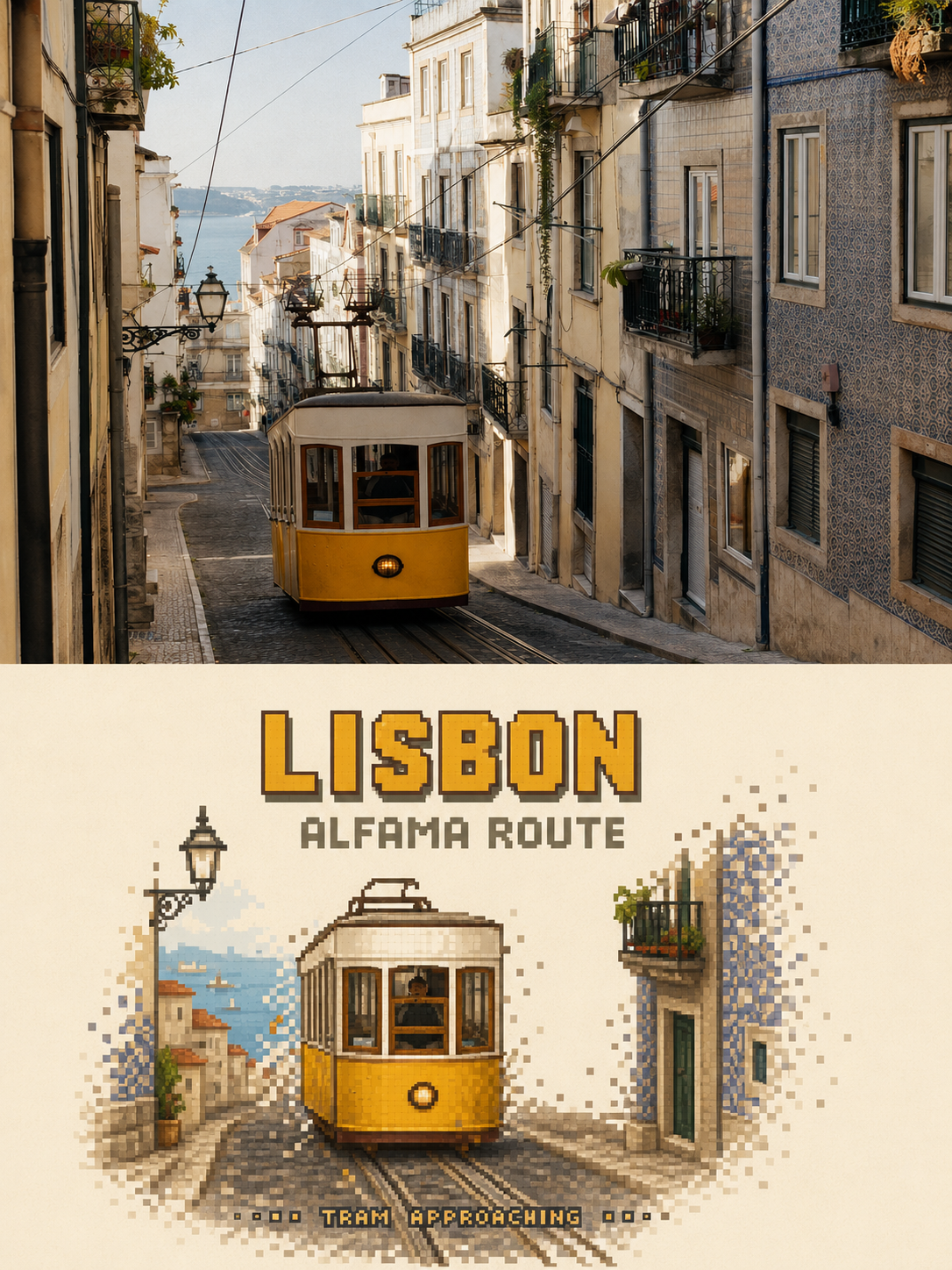
Prompt to transform travel photos into pixel-game-style exploration posters
Prompt
Please turn each travel photo I upload into a separate, standalone, high-end pixel-game travel poster. Do not create collages — one photo corresponds to one complete finished poster.

Overall use a strict 3:4 portrait composition. Divide the image vertically into two nearly 1:1 regions, with a straight, clear, clean horizontal boundary in the middle. Output only the front of the poster; do not generate frames, walls, handheld displays, or mockups.

### Upper half: high-fidelity original photography

The upper half must faithfully preserve the original photograph.

Accurately keep the identity and number of subjects in the photo, the poses of people or animals, directions of vehicles and boats, building structure, terrain relationships, viewpoint, spatial perspective, foreground/background occlusion, real materials, natural light and shadow, and the original color atmosphere.

Apply only slight, restrained color grading suitable for travel magazines, art publications, or photography exhibitions, and add a very thin film grain. The upper half must still clearly read as a real photograph.

Do not illustrate the photo, do not move, replace, add, delete, or enlarge subjects, do not remodel buildings, mirror the scene, change people’s actions, or fill the frame with a blurred photo.

### Lower half: subject-refined pixel-game redraw

Do not pixelate the entire photo.

First identify the single visual subject in the photo that most deserves the viewer to approach, operate, enter, or continue exploring, for example:

- A landmark building with a distinct silhouette
- A boat, vehicle, or other travel conveyance
- A person or a small group with a clear action relationship
- A door, a stall, a bridge, or an independent travel object
- A stretch of road, steps, or a navigable route that can represent the photo’s story

Choose only one primary visual anchor.

Preserve the subject’s most recognizable contours, pose, orientation, key structures, and signature colors, and reconstruct it as an aesthetically mature, standalone travel-game character, location, or interactive object.

The subject typically occupies about 35%–60% of the lower half’s width and about 25%–45% of its height, placed centered-lower or naturally offset according to the original scene direction.

Do not redraw according to the original full framing, original proportions, or original background density.

### Environmental reduction

Keep only one to three environmental cues that can explain place, direction, and action relationships, for example:

- A short segment of road, track, steps, or wake
- Two or three building facades or mountain fragments
- A few trees, street lamps, guardrails, or a shoreline
- Several groups of ripples, reflections, or ground color blocks
- A very small distant person, vehicle, or boat as a scale hint

Remove other tourists, repeating window panes, dense vegetation, billboards, cluttered traffic, complex skies, unrelated buildings, and photographic noise.

The lower half must retain approximately 50%–65% continuous warm off-white paper area. Allow blank areas to directly represent sky, air, water surface, distance, street, or unexplored game area.

### Pixel medium

Rebuild the subject using square or near-square pixel blocks with clear edges.

- Use smaller, denser pixel blocks at subject-identification-critical areas.
- Use medium-sized pixel blocks for the subject’s main mass.
- Gradually decrease pixel density for roads, water ripples, vegetation, reflections, and distant elements.
- Keep the subject relatively intact internally; along the outer contour, road direction, water flow, mountain slope, or motion direction, break into grid-step offsets, stagger, scatter, and disappear into the paper-white.
- Contours must have distinct stepped hard edges.
- Small gaps of paper may appear between pixel blocks.

This is not a photo mosaic filter, not an overall downscale of the photo, and not blurry pixelation, cyber glitch, or data-corruption effects.

Overall it should feel like an indie travel game with mature art direction: a real place compressed into a small level that can be approached, entered, and further explored.

### Game text information

Text is not a tiny editorial annotation but part of the game scene information.

Based on identifiable place, subject, and action in the photo, extract and keep only three layers of English information:

1. Main title: place, landmark, or scene name, 1–3 English words.
2. Area subtitle: route, district, or scene type, 1–3 English words.
3. Status info: the real action or state occurring in the photo, 2–4 English words.

If a specific place cannot be confirmed, do not invent place names, coordinates, or dates; use subject and scene names instead.

The main title is the lower half’s second visual focal point:

- Use a true pixel display font built on the grid (8-bit or 16-bit pixel font).
- All caps, glyphs thick, square endpoints, no anti-aliasing.
- Width usually occupies about 35%–55% of the lower half.
- Must be clearly legible at normal viewing distance; not reduced to a marginal technical note.
- You may use a dark face color extracted from the photo and add a one-pixel light or feature-color hard-edge pixel shadow.
- Long titles may be compactly split into two lines.

The area subtitle is about 35%–45% of the main title’s size, like a map classification.

Status info can be smaller but must remain legible at normal viewing distance and should align naturally along the subject baseline, road, wake, or water ripples.

Text must use the same pixel grid, limited palette, and hard-edge mechanics as the image, so it reads as if it grows out of the game scene rather than being an overlaid monospaced font.

Do not generate other text, numbers, author names, signatures, accounts, brands, logos, QR codes, or URLs.

### Color

Extract the palette entirely from the current photo and compress it to about 6–12 main shades.

Keep the subject’s most recognizable colors and use adjacent light/dark shades to build volume. You may keep one genuinely high-saturation color from the photo as a visual accent.

The warm off-white paper must be the largest color block in the lower half.

Do not default to neon blue/purple, cyber palettes, console-high-saturation colors, or sunset orange unrelated to the original photo.

### Overall mood

Real, quiet, lived-in, with a sense of in-game exploration.

Like an ordinary moment during travel suddenly preserved as an area-unlock illustration, location map, or save-state screen in an indie game.

Gamification should arise from subject distillation, pixel structure, level-like spatial composition, and textual information hierarchy — not from stacking HUD elements and game icons.

### Strictly avoid

Avoid: full-scene pixel redraw, same-crop same-scale redraw, complete pixel background, photo mosaic filter, overall low resolution, blurry pixelation, smooth vector illustration, generic pixel landscape, generic landmark icon, giant HUD, health bars, buttons, dialogue boxes, inventory panels, commercial game logo, voxel 3D, Minecraft blocks, cyber glitch, data corruption, neon palette, invented landmark, invented people, altered architecture, excessive text, tiny unreadable title, ordinary typewriter font, author name, signature, watermark, pixels crossing the horizontal divider.
Input images
Summary
Create travel posters that retain the upper half of the travel photo as a real photograph and convert the lower half into a pixel-game style.